Wednesday, 16 March 2016

Wednesday 17th mar 2016


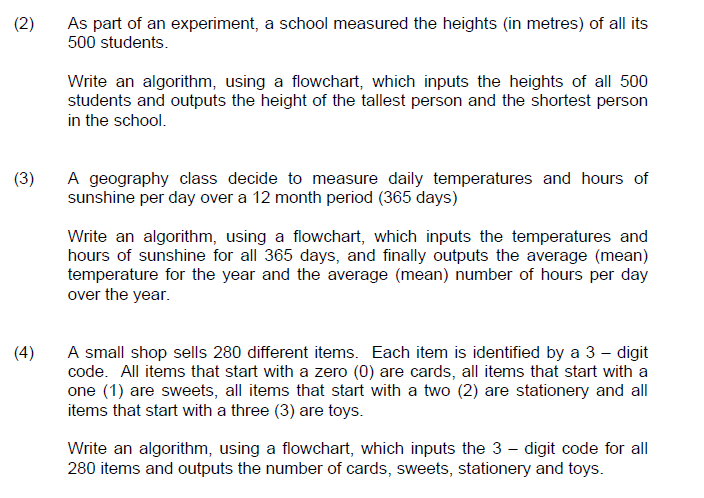
(2) As part of an experiment, a school measured the heights (in metres) of all its 500 students.
Write an algorithm, using a flowchart, which inputs the heights of all 500 students and outputs the height of the tallest person and the shortest person in the school.

(3) A geography class decide to measure daily temperatures and hours of sunshine per day over a 12 month period (365 days)
Write an algorithm, using a flowchart, which inputs the temperatures and hours of sunshine for all 365 days, and finally outputs the average (mean) temperature for the year and the average (mean) number of hours per day over the year.

(4) A small shop sells 280 different items. Each item is identified by a 3 – digit code. All items that start with a zero (0) are cards, all items that start with a one (1) are sweets, all items that start with a two (2) are stationery and all items that start with a three (3) are toys.
Write an algorithm, using a flowchart, which inputs the 3 – digit code for

Pseudocode exercise questions

Add caption

Tuesday, 8 March 2016

Pseudocode Lecture (Wed 9th Mar'16)

QUESTION 1: 
A geography class decide to measure daily temperatures and hours of sunshine per day over a 12 month period (365 days)
Write an algorithm, using pseudocode, which inputs the temperatures and hours of sunshine for all 365 days, and finally outputs the average (mean) temperature for the year and the average (mean) number of hours per day over the year.

SOLUTION
1 sum_temp = 0: sum_hours = 0

2 for count = 1 to 365 do
3 input temp, hours
4 sum_temp = sum_temp + temp
5 sum_hours = sum_hours + hours
6 next

7 mean_temp = sum_temp/365
8 mean_hours = sum_hours/365
9 print mean_temp, mean_hours

QUESTION 2: 
As part of an experiment, a school measured the heights (in metres) of all its 500 students.
Write an algorithm, using pseudocode, which inputs the heights of all 500 students and outputs the height of the tallest person and the shortest person in the school.

SOLUTION
1 tallest = 0
2 shortest = 500

3 for count = 1 to 500 do
4 input height
5 if height > tallest then tallest = height
6 if height < smallest then smallest = height
7 next

8 print tallest, shortest


Friday, 16 October 2015

ICT FORUM

Monday, 12 October 2015

ADVANCED FEATURES OF MS WORD

COURSE WORK 
GRADE 6S

Write down the shortcut keys for the following functions: 

  1. Apply Heading 1
  2. Apply Heading 2
  3. Apply Heading 3
  4. Apply list bullet 
  5. Cancel 
  6. Hanging Indent
  7. Copy format 
  8. Normal style 
  9. Paste format 
  10. Thesaurus 

Sunday, 11 October 2015

FETCH EXECUTE CYCLE ANIMATION TUTORIAL

The following link is a very user friendly and easy to learn tutorial on fetch execute cycle.

FETCH EXECUTE CYCLE ACTIVITY - CLASSWORK

Click on the link below to perform an activity on fetch execute cycle.
You will be graded on this activity. After completing the activity, take its print out and attach the sheet on your note books.

THE FETCH EXECUTE CYCLE

Saturday, 10 October 2015

Validation

Validation is the automated checking by a program that data is reasonable before it is accepted into a computer system. Different types of check may be used on the same piece of data; for example an examination mark could be checked for reasonableness by using a range check, a type check and a presence check. When data is validated by a computer system, if the data is rejected a message should be output explaining why the data was rejected and another opportunity given to enter the data.


Saturday, 3 October 2015

SYLLABUS

Download the syllabus for unified tests by clicking on the link below :

CLICK TO DOWNLOAD 

MS WORD HANDOUTS

Download the handouts on mail merge by clicking on the link below :

CLICK TO DOWNLOAD 

MAIL MERGE

Download the handouts on mail merge by clicking on the link below :

CLICK TO DOWNLOAD


Wednesday, 30 September 2015

LOSSY AND LOSSLESS COMPRESSION


Show understanding of the principles of data compression (lossless and lossy compression algorithms) applied to music/video, photos and text files
When data other than text is being transmitted, e.g. on the Internet, it is important to limit the amount of data that needs to be sent to stop the time taken to download the data being unreasonably long. The amount of data can be limited by reducing the file size of pictures so that they take up only a small part of the screen or restricting them to a few colours. Speeding up the transmission of the data is achieved by reducing the amount of data that is sent. This is known as file compression.
Compression can be either lossy or lossless. Lossless compression means that no data is lost.


LOSSY COMPRESSION
Lossy compression involved sacrificing some of the data in order to reduce the file size. Lossy compression techniques reduce the quantity of data in two ways. First by using complex mathematical encoding and secondly by deliberately losing some types of visual information that our eyes and brain usually ignore (this is called quantization).
For example, the video frame rate may be reduced from the normal 25 frames per second down to around 15 frames per second before there is a perceptible loss in quality. The frames themselves may be treated as separate still images, and compressed individually using JPEG compression. Different areas of a frame may be compressed by different degrees – an area of blue sky which lacks detail might be compressed by 25:1, whereas a person’s face might only be compressed by 5:1. Depending on the amount of action in the video, only some areas of each frame may change from one frame to the next and only the changed data need be stored. The size of the picture may also be reduced, reducing the overall quantity of pixels to be stored.
If lossy compression is taken to an extreme, it can result in a significant loss of picture quality. The higher the compression ratio, the worse the resulting image. For instance, colour fidelity fades and the edges of objects become very obvious, until eventually the results is unwatchable.
JPEG image compression works in part by rounding off nonessential bits of information. There is a corresponding trade-off between preserving information and reducing size. A number of popular compression formats exploit these perceptual differences, including those used in music files, images, and video. Lossy image compression can be used in digital cameras, to increase storage capacities with minimal degradation of picture quality. Similarly, DVDs use the lossy MPEG-2 Video codec for video compression.

LOSSLESS COMPRESSION
Lossless compression uses mathematical techniques such as Huffman coding or Discrete Cosine Transformation (DCT), to reduce the quantity of information to be stored, while still being capable of reproducing the original image without any loss in quality.
Lossless data compression algorithms usually exploit statistical redundancy to represent data more concisely without losing information, so that the process is reversible. Lossless compression is possible because most real-world data has statistical redundancy. For example, an image may have areas of colour that do not change over several pixels; instead of coding "red pixel, red pixel, ..." the data may be encoded as "279 red pixels". This is a basic example of run-length encoding; there are many schemes to reduce file size by eliminating redundancy.
Compression standards include MPEG, M-JPEG, Cinepak,

ONLINE COLLABORATION - COURSEWORK


ONLINE COLLABORATION - COURSEWORK 


     Q 1: Differentiate between audio and video conferencing.                         [2]

      Q 2: Enlist items required for a video conferencing.                                  [2]

      Q 3: Explain the advantages and disadvantages of video conferencing.    [2]

      Q 4: Disadvantages of social networking.                                                   [2]

       Q 5: Explain the usage of Skype.                                                                [2]

Sunday, 27 September 2015

GRADE 9 ASSIGNMENT (Deadline Monday, 5th October'15)

MEMORY AND STORAGE DEVICES:
  • The below mentioned assignment must be submitted on 5th October'15.
  • In case of late submission, 2 marks will be deducted.
  • Assignment must be NEATLY done on your notebooks. (don't forget to write the complete questions )

 ANSWER THE FOLLOWING QUESTIONS:
  1. Describe 2 difference between RAM and ROM.
  2. Describe what is stored on RAM and ROM , also explain why that type of memory is appropriate.  
  3. State one type of software which must be stored in a computer’s ROM, justifying your answer. 
  4.  Name three different types of storage media and give an example of each. 
  5. State one type of software which must be stored in a computer’s RAM, justifying your answer.


Operating System